
• Home
    • 01. DAY BOOK – Čeština
    • 01. DAY BOOK – Dansk
    • 01. DAY BOOK – English
    • 01. DAY BOOK – Español
    • 01. DAY BOOK – Español
    • 01. DAY BOOK – български

ClinicSoftware.com Knowledge Base ClinicSoftware.com Knowledge Base

ClinicSoftware.com Knowledge Base

  • HOW IT WORKS
    • Software Features
    • Marketing Features
    • Online Booking
    • Paperless Features
    • Photo And Draw Features
    • Tracking Features
    • Sell Cycle Features
    • Fully Responsive Features
    • Business Reports Features
    • Automated Features
    • Reminders Features
    • Apps Features
    • Multi Location Features
    • Add-Ons
  • WHO IT’S FOR
  • MARKETING
  • MORE
    • Support
    • Find-Us
    • Migrate To ClinicSoftware
    • How We Provide Training
    • Partner With Us
    • Academy
    • Support Chat
    • Blog
    • Editions
    • ClinicSoftware.com TV
    • GDPR
    • ICD-10 Database
    • PCI-DSS Compliant
    • Cloud Hosting
    • Latest UK Shows
    • UK Press
  • Classic Edition
  • CLOSE / RETURN TO SOFTWARE
Home Knowledge Base 5. COURSES / SESSIONS 06. TANNING COURSES

06. TANNING COURSES

26th January 2017 Posted in: 5. COURSES / SESSIONS Hits: 50


From this page, you can manager Tanning minutes usage.
It will display the minutes left, used, last purchased tanning course, active course and usage history.
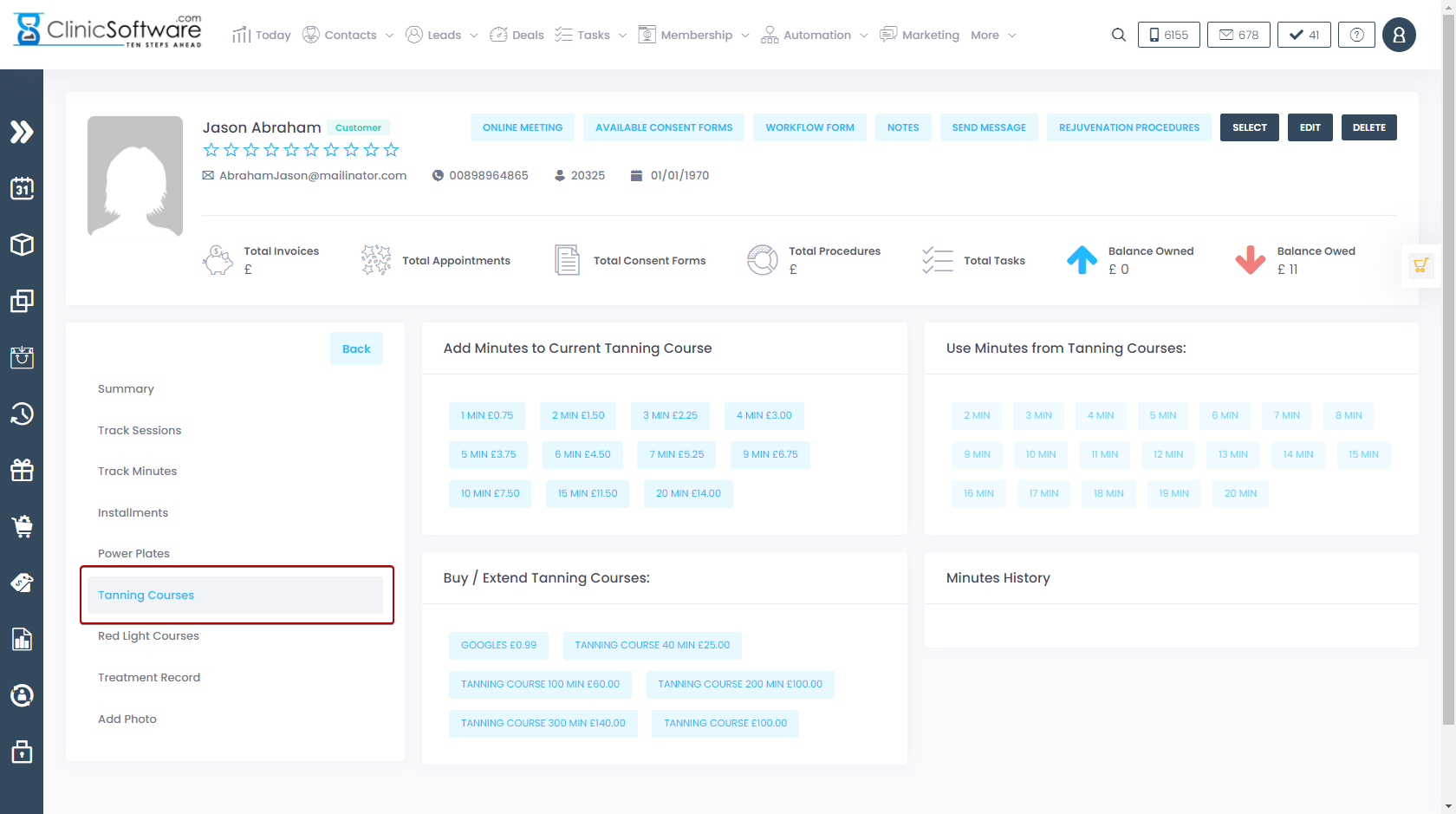
The Tanning Courses page is divided into 4 sections:

  • Add minutes to Current Tanning Course – buy new minutes
  • Use minutes from Tanning Course – use bought minutes
  • Buy / Extend Tanning Course – buy new minutes
  • Minutes History – history of how many minutes were used at what date

Tanning minutes and prices can be configured from the Admin Area -> Tanning Prices.

Selling Tanning courses

To sell Tanning courses click on the course from the “Buy / Extend Tanning Course” section.
The course will be added to the cart, from there press CASH/CARD to complete the payment.

Using Tanning minutes

To use power plates minutes, in the “Use minutes from Tanning Course” click on the button with the corresponding number of minutes that you wish to use.

© 2017 ClinicSoftware.com